Thermostat Says "Waiting for Equipment": What It Means and How Long to Wait
| Written by | Ask About HVAC Editorial Team | Expert review | Pending |
|---|---|---|---|
| Published | Last updated | ||
| Sources | 4 cited | Reading time | 3 min |
Quick answer
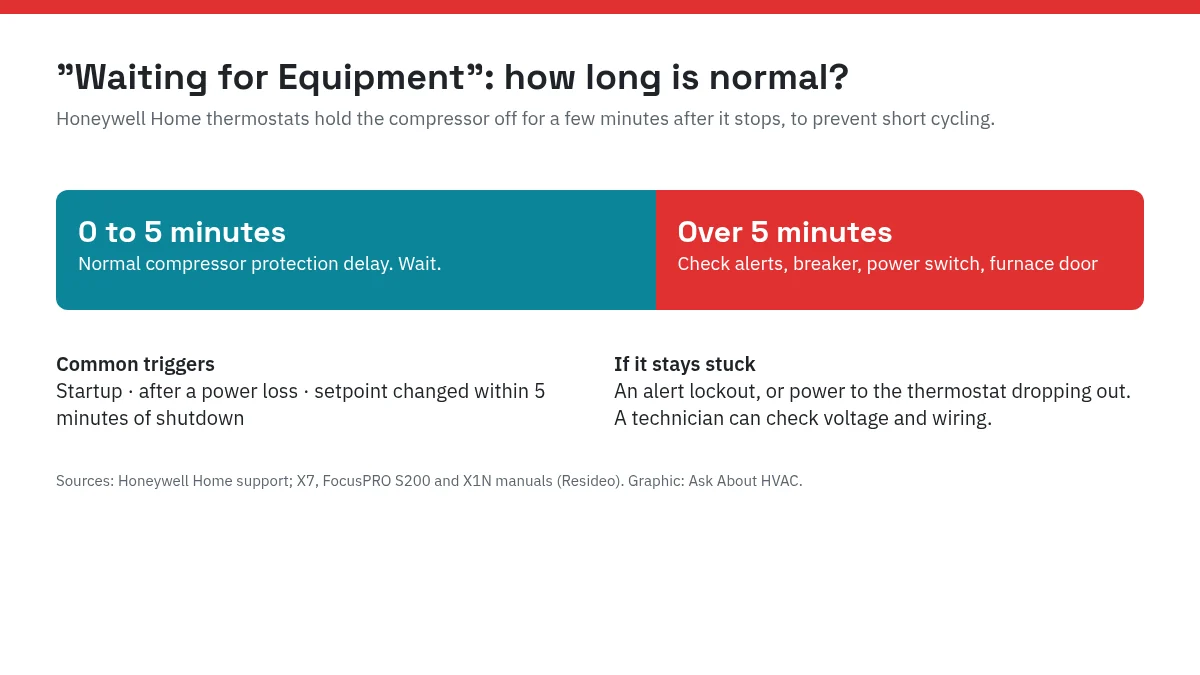
"Waiting for Equipment" on a Honeywell Home thermostat means its built-in compressor protection is running. After the compressor shuts off, the thermostat holds it off for a few minutes so it does not restart too soon and get damaged. Honeywell Home says the delay can be up to five minutes under normal conditions, and the message clears on its own (Honeywell Home). If it stays on longer than 5 minutes, the likely causes are an alert lockout or an interruption in power to the thermostat.
When the message is normal
The X7 manual lists the three most common times you will see the delay (Honeywell Home X7 manual):
- Right after the system starts up.
- After a power loss, including a tripped breaker or a power outage.
- When someone changes the setpoint within 5 minutes of the equipment shutting off.
Once the wait is over, the message disappears and the display shows that it is calling for heat or cooling, for example "Heat on" or "Cool on" (X1N guide).
Different Honeywell Home models word it differently. The company says some show "Wait," some show "Waiting for Equipment," and some flash "Cool on" during the same delay (Honeywell Home). Other thermostat brands have their own compressor delays and messages, so check your manual if yours is not a Honeywell Home model.
What to do, step by step
- Wait 5 minutes and time it. The FocusPRO S200 manual says to wait 5 minutes to see if the thermostat makes a heat or cool call (S200 manual).
- Avoid changing the setpoint again during the wait. A setpoint change soon after the equipment shuts off is one of the triggers for the delay.
- If it is still showing after 5 minutes, look for an alert icon on the display. The X7 manual says an alert lockout keeps that equipment locked out until the alert condition is resolved.
- Check that the system has power. The S200 manual's checks are: reset the circuit breaker if needed, make sure the heating and cooling system's power switch is on, and make sure the furnace door is closed securely.
- Still stuck? Call a technician. Honeywell Home says a delay longer than five minutes may mean a problem with the voltage to the thermostat, and a contractor can check that the voltage is in range and that no wires are shorted.
Why it can get stuck
The X7 manual gives two reasons the message can stay longer than the normal delay (Honeywell Home X7 manual):
| Reason | What is happening | Who fixes it |
|---|---|---|
| Alert lockout | An active alert keeps the equipment locked out until the condition is cleared | Read the alert; some are homeowner fixes, others need the installer |
| Intermittent power loss | A shorted wire or high equipment draw can briefly cut power to the thermostat each time it calls for heat or cooling, restarting the delay | An installer, who can test with only the R and C wires connected |
The power-loss case explains a frustrating pattern: the thermostat calls for heat or cooling, the equipment draws power, the thermostat briefly loses power, and the delay starts over. The manual's suggested test, removing every wire except R and C at the wallplate, is an installer step.
Why the delay exists
A compressor that shuts off and restarts too quickly, called short cycling, can be damaged. Honeywell Home describes the feature as a minimum off timer: once the compressor turns off, the thermostat keeps it off for a few minutes before allowing a restart (Honeywell Home).
That is why you may also see the message on a heat pump right after switching modes or after the system was turned off to let ice melt. Our guide to ice on a heat pump in winter explains when a frozen outdoor unit is normal.
Related settings people confuse with it
The fan setting does not change the compressor delay. With the fan on Auto, the fan runs only when heating or cooling runs, so you may feel no air at all during the wait. Our article on whether the AC fan should be on or auto covers what each fan setting does.
FAQ
How long does "Waiting for Equipment" last?
Honeywell Home says the normal delay is up to five minutes. The X7 manual says the short-cycling delay should last 5 minutes at most.
Can I bypass the Waiting for Equipment delay?
It exists to keep the compressor from restarting too soon after shutdown, which Honeywell says can damage it. Waiting is the intended fix.
Why does it say Waiting for Equipment after I change the temperature?
The X7 manual says the delay most often happens at startup, after a power loss, or when someone changes the setpoint within 5 minutes of the equipment shutting off.
Does Waiting for Equipment mean my furnace is broken?
Not by itself. It is normal for a few minutes. If it lasts longer than 5 minutes, check for alerts, then have a professional check the thermostat's power and wiring.
Sources
| # | Source | Site |
|---|---|---|
| 1 | Why is my thermostat display showing "wait," "waiting for equipment," or flashing "cool on"?, Honeywell Home | honeywellhome.com |
| 2 | X7S & X7B Installation and User Manual: Troubleshooting and Support, Honeywell Home (Resideo) | docs.honeywellhome.com |
| 3 | FocusPRO S200 Series User Manual: Troubleshooting and Support, Honeywell Home (Resideo) | docs.honeywellhome.com |
| 4 | X1N Installation and User Guide: System Operation, Honeywell Home (Resideo) | docs.honeywellhome.com |
Every number above was checked against these sources. Found an error? See corrections or email contact@askabouthvac.com.
Expert review status: pending
The editorial fact-check of this guide is complete. It is queued for review by J.T. Bratcher, a Texas-licensed air conditioning contractor. His name and the review date will appear here and at the top of the page only after he approves it.
Related answers
- Th · Thermostats
Should Your AC Fan Be On or Auto? What the Humidity Research Shows
In humid climates, keep the AC fan on Auto: measured tests show fan On puts water from the coil back into your air. When On or Circulate makes sense, and a simple test for your home.
- Fu · Furnaces
Furnace Filter Put In Backwards? Which Way the Arrow Goes and What to Do
The airflow arrow on a furnace filter points toward the blower, away from the return duct. If yours is in backwards, turn the system off and flip it. Here is how to find the right direction when the arrow is missing or hard to read.
- Hp · Heat Pumps
Ice on Your Heat Pump: Normal Frost or a Problem?
A thin layer of frost on a heat pump's outdoor coil in winter is normal and should clear in a defrost cycle. Thick ice that keeps growing, covers the top or fan, or never melts points to a problem. What to check and what not to do.